

Data Handling#
This section describes how SunPeek handles measurement data, implements data quality checks, and processes timestamps for Power Check analysis.
See also
For a comprehensive explanation of these topics, see section C.7 in Guide to ISO 24194:2022 Power Check.
Timestamps#
SunPeek results depend on solar position (angle of incidence, shading, irradiance, etc.), so correct time zone parsing is crucial. SunPeek accepts arbitrarily sampled timestamps (no fixed sampling rate required). Specific criteria defined in ISO 24194 determine if data chunks can form valid 1-hour averages.
Tip
Use time zone aware timestamps and avoid daylight saving time (DST), as recommended by ISO 24194. The preferred format is ISO 8601-1:2019 with explicit time zone indication.
Note
SunPeek does not interpolate or resample data. Data channels from different sources with different timestamps cannot be combined directly—users must align timestamps before upload.
Time Zone Options#
Internally, SunPeek always uses time zone aware timestamps, enabling unambiguous conversion to any display time zone. For loading measurement data, SunPeek supports these time zone configurations:
UTC offset included in data: Timestamps contain the offset, e.g.,
2023-10-04T11:14:00+01:00.Plant local time zone with DST: Uses the plant’s location time zone, including DST changeover.
Plant local time zone without DST: Same as above, but without DST. Common for data loggers.
Any other time zone: Any valid time zone (e.g., UTC, “Europe/Vienna”). Note: named time zones often include DST.
Data Storage#
SunPeek stores raw (uncorrected) measurement data as time series. Ingesting new data overwrites overlapping existing data, allowing correction of erroneous uploads. Batch deletion and single-file deletion are also supported.
Data Quality Checks#
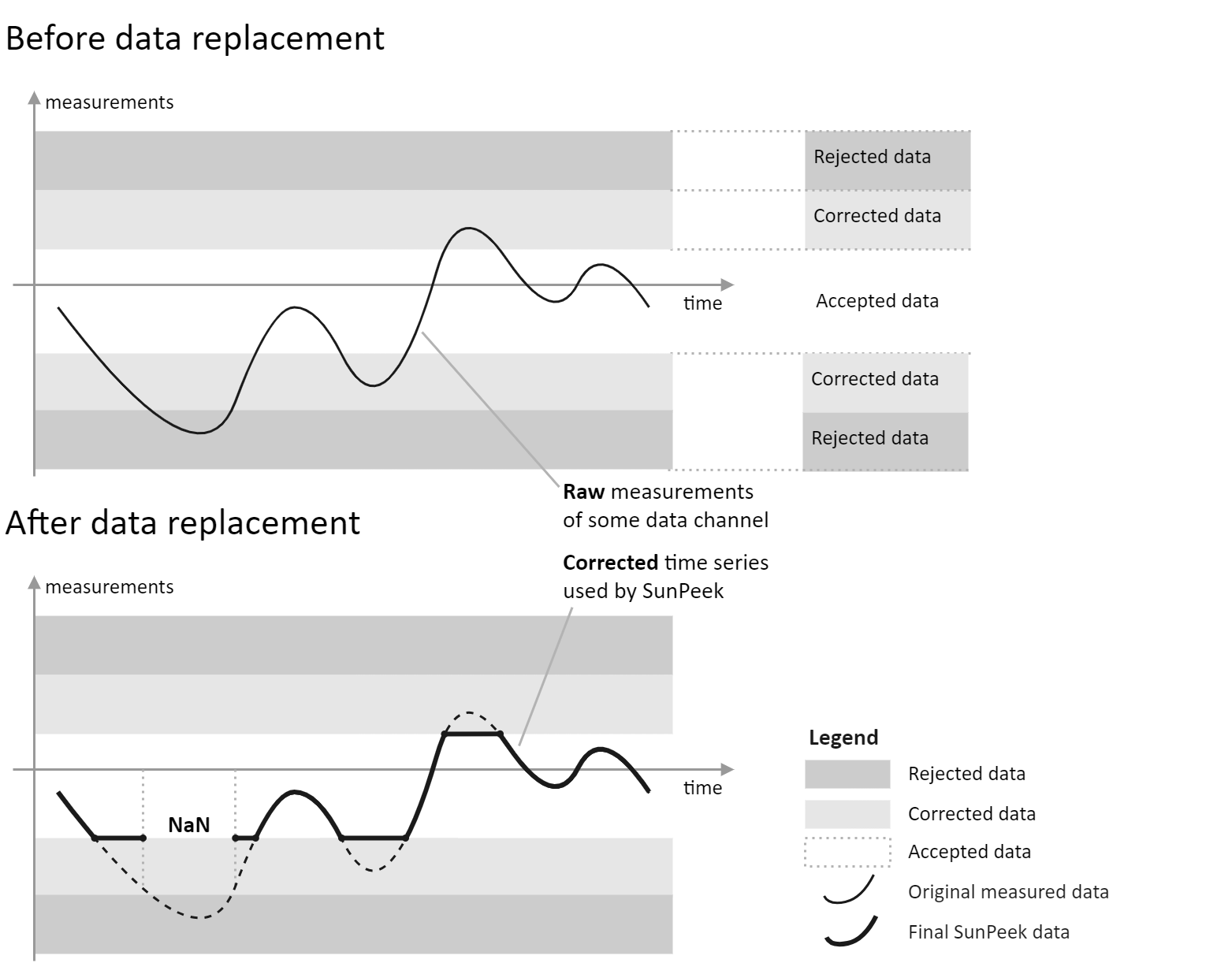
SunPeek excludes physically impossible values from analysis. For example, a solar irradiance of 2000 W/m2 is considered erroneous. Values outside valid ranges are set to NaN (not-a-number). Values slightly outside physical limits (within a “tolerance range”) are corrected to plausible values.
Note
Corrections happen on the fly—raw data is never overwritten. Data quality settings can be changed at any time and take effect immediately in calculations.
Sensor Types#
During sensor mapping, SunPeek assigns a sensor type to each data channel. For example, mapping a channel as “inlet temperature” sets its type to “Fluid temperature”, which has specific validity limits.
Physical Units#
Each sensor type defines allowed units. For example, for power measurements, W, kW, and MW are accepted units; kWh or K are not.
Power Check “Data Records”#
Real-world data is never perfect. For Power Check, SunPeek tolerates some missing or invalid values using three quality criteria:
Timestamp validation: All relevant data channels must be available and valid. Timestamps with any invalid (NaN) measurements are excluded.
1-hour averages must meet these criteria (see Fine-Tuning Parameters for configuration examples in Python):
max_nan_density(default: 10%): Maximum allowed percentage of NaN values.min_data_in_interval(default: 10): Minimum number of valid measurements per 1-hour interval.max_gap_in_interval(default: 10 min): Maximum gap between measurements within an interval.
Power Check filtering: Only data records meeting operating condition restrictions become “valid data records” per ISO 24194.
Note
These criteria work across varying sampling rates and interval lengths, handling diverse data scenarios with a single configuration.