

Sensor Mapping#
See also
This page explains sensor mapping concepts. For a step-by-step WebUI walkthrough, see Sensor Mapping in the WebUI Tutorial.
For Python API usage, see Using SunPeek with custom plant in the Python Tutorial.
For technical background on required measurements, see Section C.4 in the Guide to ISO 24194:2022 Power Check.
Overview#
Sensor mapping assigns data channels from your measurements to input slots on SunPeek components (Plant and Array), as illustrated in the figure below. By mapping your data columns to the appropriate slots, you tell SunPeek how to interpret your measurement data for Power Check and other calculations.
Key insight: Not every slot needs to be filled. SunPeek can derive some values from others.
For example, if thermal power is not measured directly, SunPeek can calculate it from volume flow,
temperatures, and fluid properties, so you can leave the tp slot empty as long as these
alternative inputs are provided.
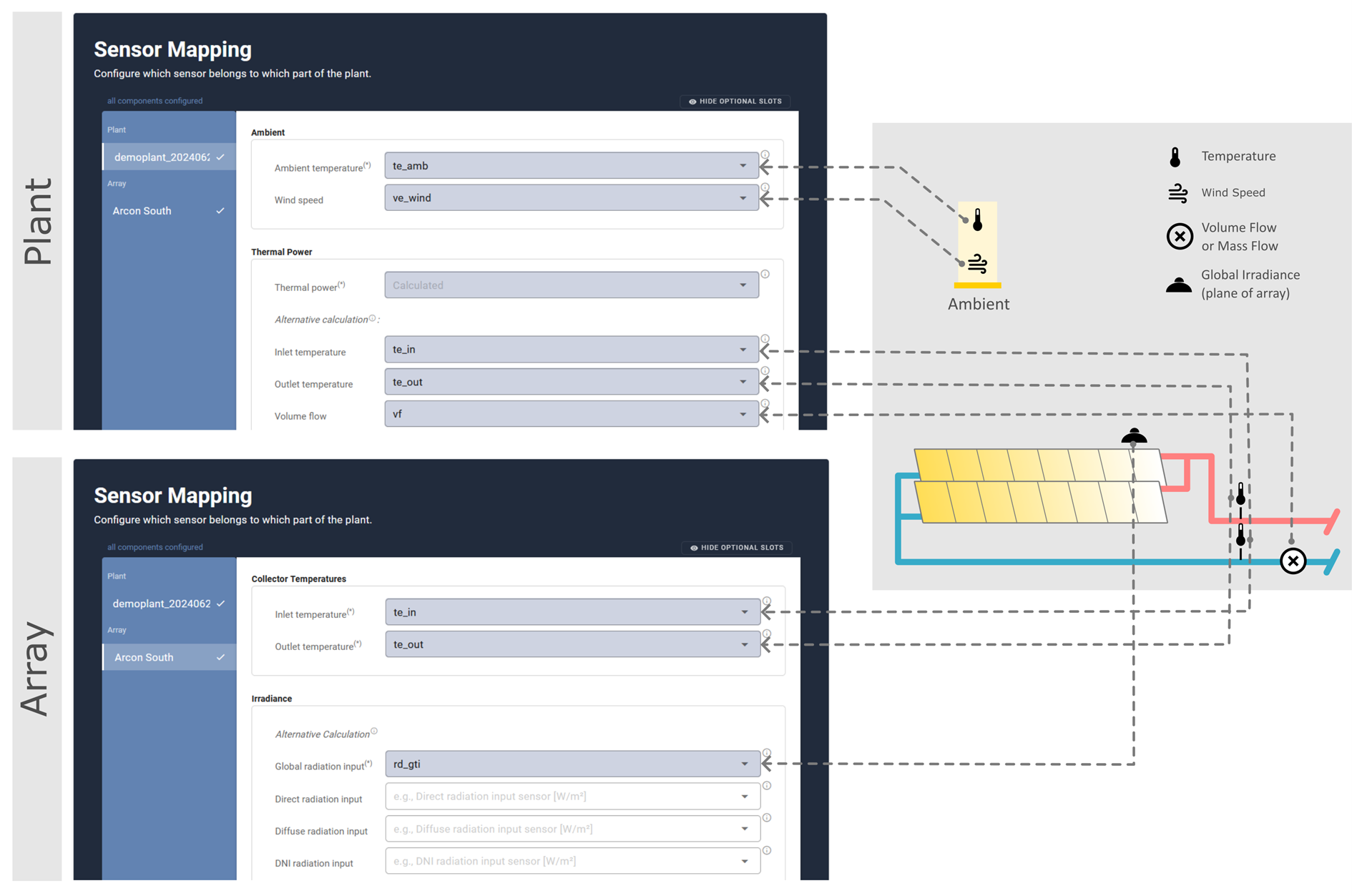
Sensor mapping concept: measurement data channels are linked to SunPeek input slots.#
How it works internally#
Sensor types: Each slot expects a specific type of measurement (e.g.,
te_amb for ambient temperature, vf for volume flow) and has an associated sensor type that
determines valid physical units and data quality checks. See Data Handling for details.
Calculation strategies: For quantities like thermal power, SunPeek’s backend defines multiple calculation strategies. When verifying that sensor mapping is complete, SunPeek checks whether at least one strategy has all its required inputs. If so, the mapping is considered successful — even if some slots remain empty.
Tip
The same sensor can be mapped to multiple slots. For example, the same temperature sensor can serve as inlet temperature for both the Plant and an Array—this is common in systems without a heat exchanger.
Key Concepts#
Required vs Optional Slots#
Slots fall into three categories:
Required (Y)
- Always needed for Power Check.
- Examples: Ambient temperature (te_amb), Array inlet/outlet temperatures (te_in, te_out).
Setup-dependent (Y-S)
- Required only for certain plant configurations.
- Example: Volume flow (vf) is required if thermal power is not directly measured.
Optional (N)
- Enhance accuracy or enable additional analysis features.
- Examples: Relative humidity (rh_amb), Wind speed (ve_wind).
The figure below, taken from Guide to ISO 24194:2022 Power Check, summarizes which slots are required, setup-dependent, or optional for standard plant configurations (with and without heat exchanger).
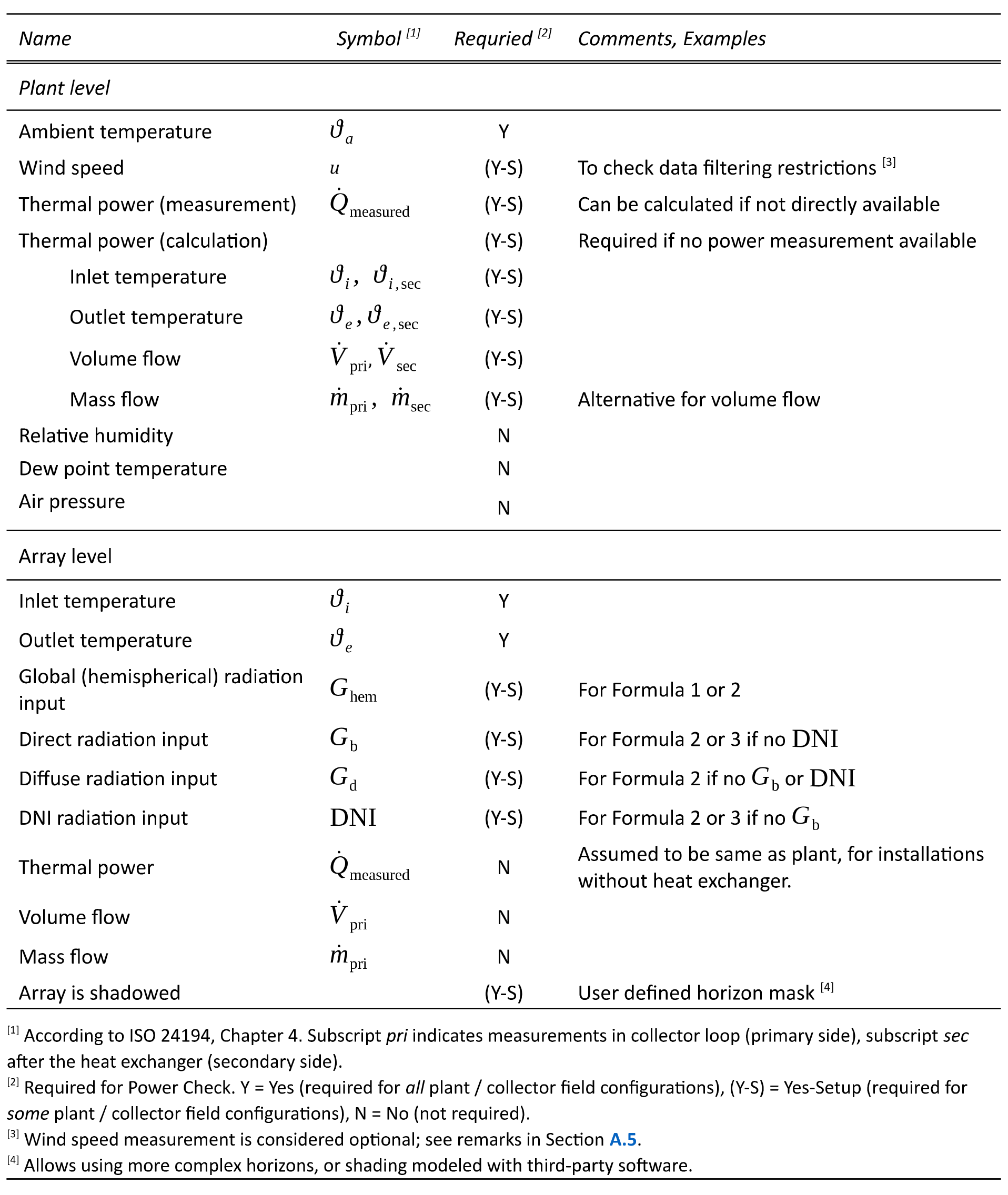
Required and optional slots for plants with one collector field.#
Virtual Sensors#
Virtual sensors are quantities that SunPeek calculates from other inputs rather than reading directly from measurement data. When the required inputs are available, SunPeek creates these virtual sensors automatically. Common examples:
Thermal power — calculated from fluid properties, volume flow, and temperature difference
Solar position — calculated from plant location and timestamp
Angle of incidence — calculated from solar position and array orientation
Virtual sensors are accessed the same way as measured sensors. See Advanced Topics for examples of working with virtual sensors in Python.
Understanding WebUI Behavior#
“Hide Optional Slots” Toggle#
When enabled, this toggle hides slots that are purely optional (e.g., relative humidity). However, some slots may still appear because they are setup-dependent: whether they are required depends on what other slots you have filled.
Example: You enable “Hide Optional Slots” but Volume Flow (vf) still appears.
This happens because SunPeek needs thermal power, and you can provide it in two ways:
Map a thermal power sensor directly to the
tpslot, ORProvide the inputs to calculate it: volume flow + temperatures + fluid
If you haven’t mapped tp, SunPeek shows the alternative inputs (vf, te_in,
te_out) because they are then required to complete the mapping.
“Alternative Calculation” Sections#
In the WebUI, some slots (like Thermal Power) show an expandable “Alternative calculation” section. This reveals the inputs needed to calculate that value instead of measuring it directly.
If you map all the alternative inputs, you can leave the main slot empty. SunPeek automatically uses the calculation path when no direct measurement is mapped.
“Sensor Mapping Successful” Status#
This status means: SunPeek can calculate everything needed for Power Check with your current mapping. It does not mean all slots are filled. SunPeek evaluates whether the minimum requirements are satisfied, considering all available calculation paths.
Example: You leave the tp (thermal power) slot empty, but the status shows “successful”.
This is correct: SunPeek found that it can calculate thermal power from your mapped
vf, te_in, te_out sensors and the configured fluid.
Calculation Dependencies#
Thermal Power Calculation#
Thermal power (tp) can be obtained two ways:
- Path A — Direct measurement:
Map a thermal power sensor to the
tpslot.- Path B — Calculated from flow and temperatures:
Provide all of these inputs:
Heat transfer fluid (configured in Array setup)
Volume flow (
vf) or Mass flow (mf)Inlet temperature (
te_in)Outlet temperature (
te_out)
SunPeek calculates:
tp = vf × ρ(T) × cp(T) × (te_out - te_in)
If Path B inputs are complete, you can leave tp empty—hence “sensor mapping successful”
even without a direct power measurement.
Note
Calculating thermal power requires a configured heat transfer fluid. See Fluids for how to set up fluids in SunPeek.
Other Virtual Sensors#
Radiation conversion uses irradiance inputs (in_global, in_beam, in_diffuse, in_dni)
to calculate plane-of-array irradiance for each collector array.
Shadow calculation can use a user-provided is_shadowed mask or calculate shading
automatically based on array geometry and solar position.
Python API#
Sensor mapping can also be done programmatically using the sensor_map parameter
when creating Plant and Array objects:
from sunpeek.components import Plant, Array

plant = Plant(
    name='My Plant',
    # ... location parameters ...
    sensor_map={
        'te_amb': 'te_amb',      # Maps CSV column 'te_amb' to plant slot
        'vf': 'volume_flow',     # CSV column name can differ from slot name
        'te_in': 'te_in',
        'te_out': 'te_out',
    },
)

array = Array(
    name='My Array',
    plant=plant,
    # ... collector and geometry ...
    sensor_map={
        'te_in': 'te_in',
        'te_out': 'te_out',
        'in_global': 'pyranometer_1',
    },
)
For a complete example, see Using SunPeek with custom plant in the Python Tutorial.
Common Questions#
Why is Mass Flow shown when I hide optional slots?
Mass Flow (mf) appears because it’s setup-dependent. In your configuration, SunPeek needs
either a direct thermal power measurement or the inputs to calculate it (including flow).
If you map Volume Flow (vf) instead, Mass Flow may no longer appear.
Why does “successful” show with seemingly incomplete mappings?
SunPeek found an alternative calculation path. For example, if you provide vf, te_in,
te_out, and configure a fluid, SunPeek can calculate thermal power—so the tp slot
can remain empty while mapping is still “successful.”
What if I have both measured and calculated values available?
If you map a sensor to a slot that could also be calculated, SunPeek uses your measured value. The calculated (virtual) sensor is only used when no measured sensor is mapped.