

Fluids#
This page explains how heat transfer fluids work in SunPeek, including the predefined fluids, how to add custom fluids, and how to access fluid properties. For a quick overview on using fluids in the WebUI, see Setting a Fluid.
Overview#
Power Check requires knowing the measured thermal power output of a solar thermal plant. If not directly measured, thermal power can be calculated based on volume or mass flow and temperature difference. However, this requires knowing the temperature- and potentially concentration-dependent fluid properties density and heat capacity.
SunPeek integrates with CoolProp, an open-source library providing thermophysical properties for many fluids, and also supports defining custom fluids.
CoolProp Fluids#
CoolProp includes a library of common solar thermal fluids (e.g., brands like Antifrogen, Pekasol, and Zitrec) and standardized fluids (e.g., water, ASHRAE glycols). SunPeek provides access to the following pre-configured CoolProp fluids:
Code |
Description |
Type |
|---|---|---|
water |
Pure water (IAPWS-95 formulation) |
Pure |
AEG |
ASHRAE Ethylene Glycol |
Mixed |
AKF |
Antifrogen KF (Potassium Formate) |
Mixed |
AL |
Antifrogen L (Propylene Glycol) |
Mixed |
AN |
Antifrogen N (Ethylene Glycol) |
Mixed |
APG |
ASHRAE Propylene Glycol |
Mixed |
GKN |
Glykosol N (Ethylene Glycol) |
Mixed |
PK2 |
Pekasol 2000 (Potassium acetate/formate) |
Mixed |
PKL |
Pekasol L (Propylene Glycol) |
Mixed |
ZAC |
Zitrec AC (Corrosion Inhibitor) |
Mixed |
ZFC |
Zitrec FC (Propylene Glycol) |
Mixed |
ZLC |
Zitrec LC (Propylene Glycol) |
Mixed |
ZM |
Zitrec M (Ethylene Glycol) |
Mixed |
ZMC |
Zitrec MC (Ethylene Glycol) |
Mixed |
See also
SunPeek includes a curated selection of CoolProp fluids commonly used in solar thermal installations. For the full list of available CoolProp incompressible fluids, see the CoolProp Incompressibles documentation.
Datasheet-Based Fluids (WPD)#
When manufacturer datasheets only provide graphical information (plots) for fluid properties, SunPeek uses a custom approach:
Extract data points from datasheet plots using WebPlotDigitizer
Train interpolation models for density and heat capacity
Use these models to calculate properties at any temperature
Pre-configured WPD fluids include:
Name |
Manufacturer |
Description |
Type |
|---|---|---|---|
Pekasolar_FHW |
Pekasolar fluid used in FHW plant (fixed concentration) |
Pure |
|
Gasokol corroStar |
Monopropylene glycol, 36 vol-% (fixed concentration) |
Pure |
|
Wocklum Thermum P |
Monopropylene glycol (variable concentration) |
Mixed |
|
Coracon SOL 5 |
Monopropylene glycol (variable concentration) |
Mixed |
|
GoS_LK100-40 |
GREENoneTEC Solarindustrie GmbH |
Monopropylene glycol (variable concentration) |
Mixed |
Note on Fluid Properties#
The choice of fluid can significantly influence Power Check results and other analyses, as density and heat capacity values vary considerably between fluids. The following figures compare these properties for selected fluids.
Tip
Similar plots can be generated and saved to disk using the fluid test suite:
pytest tests/tests_fluids/ --save-plots --plot-dir /path/to/output
See tests/tests_fluids/conftest.py for details on the --save-plots / --plot-dir options.
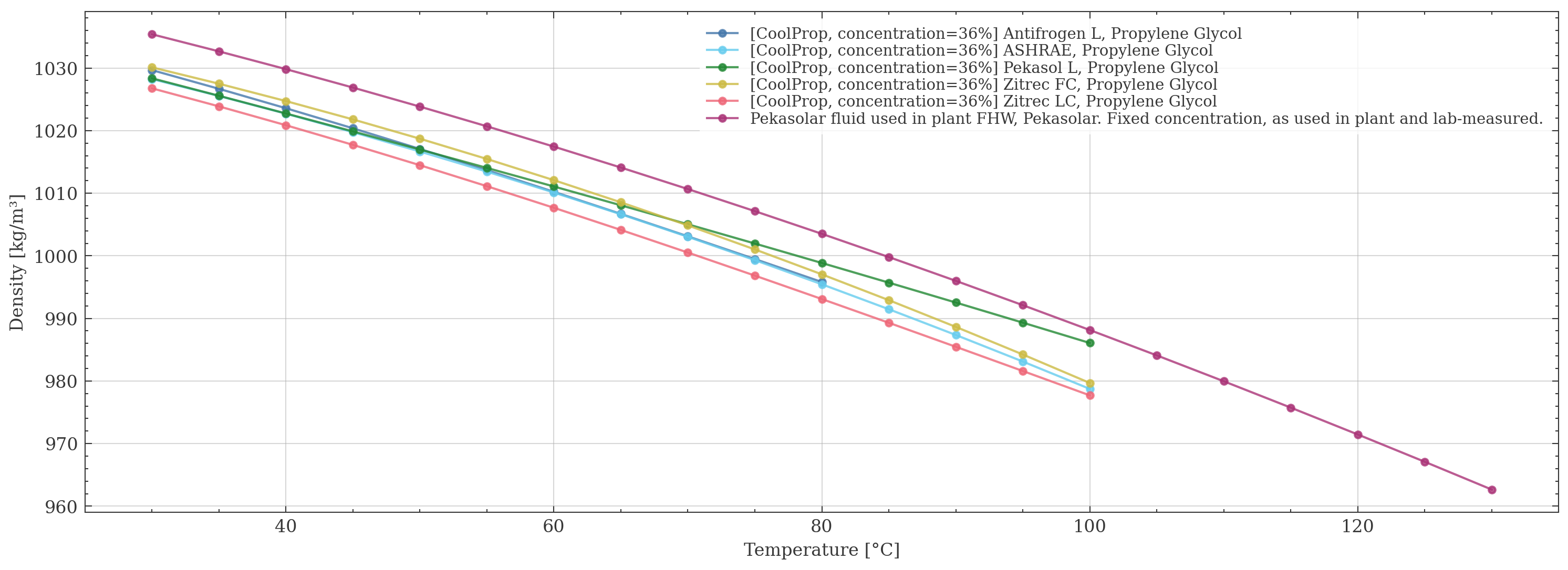
Density as a function of temperature for selected fluids.#
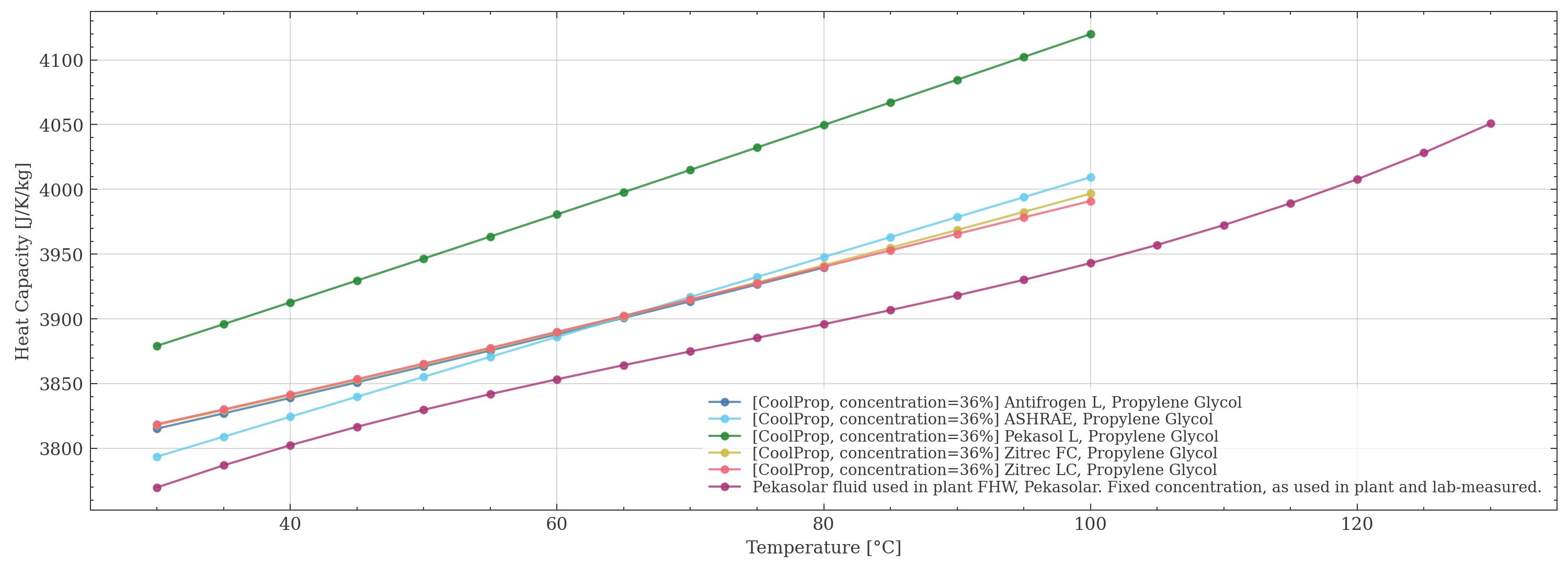
Heat capacity as a function of temperature for selected fluids.#
Using Fluids in Python#
Creating a Fluid Instance#
To use a fluid in your plant, you need to:
Get the fluid definition by name.
Create a fluid instance using
FluidFactory.For mixed (not pure) fluids, specify the concentration at instantiation.
from sunpeek.components import FluidFactory
from sunpeek.definitions.fluid_definitions import get_definition
from sunpeek.common.unit_uncertainty import Q

# For pure fluids (like water)
water_def = get_definition('water')
water = FluidFactory(fluid=water_def)

# For mixed fluids (concentration required)
glycol_def = get_definition('APG')
glycol = FluidFactory(fluid=glycol_def, concentration=Q(30, 'percent'))
Accessing Fluid Properties#
Once you have a fluid, you can calculate its density and heat capacity at any temperature. The API is identical for CoolProp and custom fluids.
Note that these fluid properties vary negligibly with pressure in typical solar thermal systems, and pressure dependence is often omitted from manufacturer datasheets. Thus, SunPeek models fluid properties as functions of temperature only.
from sunpeek.common.unit_uncertainty import to_s

temperatures = to_s([20, 40, 60, 80], 'degC')

# Works the same for CoolProp and WPD fluids
density = glycol.get_density(temperatures)
heat_capacity = glycol.get_heat_capacity(temperatures)

print(f"Density at 80°C: {density.iloc[3]}")
print(f"Heat capacity at 80°C: {heat_capacity.iloc[3]}")
Adding Custom Fluids#
If your plant uses a fluid not available in SunPeek, you can add it permanently to the package.
Note
Adding custom fluids via the SunPeek REST API or the WebUI is not yet available. Currently, custom fluids must be added to the SunPeek source code as shown here.
Prerequisites#
Datasheet with density and heat capacity plots for your fluid
A plot digitization tool such as WebPlotDigitizer
Step 1: Extract Data from Plots#
Open WebPlotDigitizer and load your datasheet images for density and heat capacity
Calibrate the axes
Extract data points along the curve(s)
For fluids with fixed concentration: create one dataset
For fluids with variable concentration: create one dataset per concentration curve, naming each dataset after its concentration value (e.g., “20”, “30”, “40”)
Export to CSV as
density.csvandheat capacity.csv, respectively.
The CSV format is simple X,Y columns:
X,Y
20.37,1040.33
39.74,1030.01
60.10,1017.35
...
Step 2: Create the Fluid Data Folder#
Create a new folder under sunpeek/definitions/fluid_data/ named after your fluid.
Place both CSV files in this folder:
sunpeek/definitions/fluid_data/
└── My Custom Fluid/
    ├── density.csv
    └── heat capacity.csv
Step 3: Register the Fluid#
Add an entry to the WPDFluids enum in sunpeek/definitions/fluid_definitions.py:
class WPDFluids(enum.Enum):
    # ... existing fluids ...

    # Your new fluid
    my_custom_fluid = WPDFluidInfo(
        'My Custom Fluid',  # Must match the folder name
        is_pure=True,       # True for fixed concentration, False for variable
        unit_density={'te': 'degC', 'out': 'kg m**-3'},
        unit_heat_capacity={'te': 'degC', 'out': 'J g**-1 K**-1'},
        # for mixed fluids (variable concentration), include the concentration unit 'c'
        # unit_density={'te': 'degC', 'c': 'percent', 'out': 'kg m**-3'},
        # unit_heat_capacity={'te': 'degC', 'c': 'percent', 'out': 'kJ kg**-1 K**-1'},
        manufacturer='Manufacturer Name',
        description='Description of the fluid'
    )
Then, add the fluid to the wpd_fluids list in the same file:
wpd_fluids = [
    # ... existing fluids ...
    WPDFluidDefinition.from_fluid_info(WPDFluids.my_custom_fluid.value),
]
Your custom fluid is now available in SunPeek and can be used like any built-in fluid.
Troubleshooting#
Fluid Not Found
If you get a “No entry found” error:
Check the spelling of the fluid name
Use partial matching:
get_definition('glycol')will find fluids containing “glycol” in their name or description
Temperature Out of Range
CoolProp returns Inf values when temperatures exceed the valid range for a fluid.
SunPeek logs a warning when this happens. Check the
CoolProp Incompressibles documentation
for valid temperature ranges.